
MEPCO Bill Check Online – View & Download Your Bill Instantly
Enter your 14-digit reference number or 10-digit Customer ID below to check your latest MEPCO electricity bill. View the billing month, payable amount, due date, meter reading, and complete bill details, then print or save a duplicate copy as PDF.
Check, view, print, or save your duplicate MEPCO bill without visiting a customer service center. This independent website provides bill-checking guidance for MEPCO consumers and is not affiliated with MEPCO, PITC, or any government organization. Last updated: August 2026.
Reviewed by the mepcobillchecker.pk team · Bill data sourced live from PITC’s official MEPCO billing system.
Need help with an incorrect or estimated bill? See our MEPCO bill correction guide.
How to Check Your MEPCO Bill Online Step by Step
Got your reference number or Consumer ID? Your bill check is just a few clicks away.
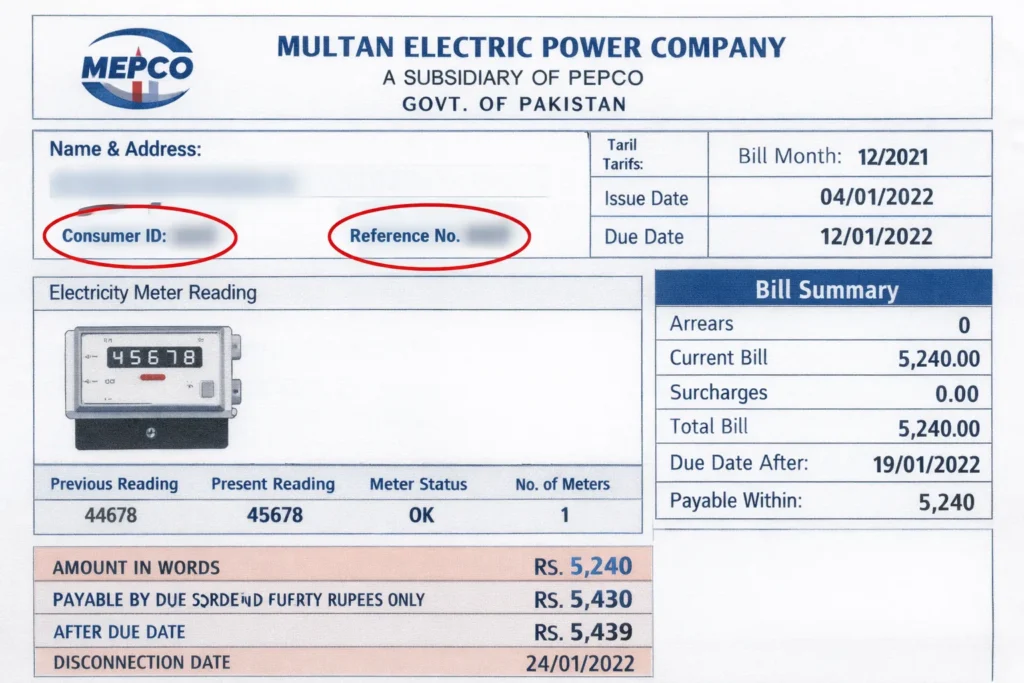
Method 1: Using Your 14-Digit Reference Number
- Take your old bill and look at the top-left corner, where you will find your 14-digit reference number. If you are unsure which number to enter or need help finding the correct Consumer ID, see our MEPCO Reference Number and Consumer ID guide before checking online.
- Browse and open the PITC-powered official billing page.
- Enter your reference number carefully with no spaces and click Submit.
- Your latest MEPCO consumer bill will load instantly with due date, full charges, and meter reading.
- Want a duplicate copy? Just click to download or print. That’s all.
Method 2: Using 10-Digit Consumer ID
Lost your reference number? You can also use the 10-digit Consumer ID printed right next to it. Follow the same steps above — this method works just as fast for an online bill check.
Method 3: Check your MEPCO Bill by SMS (No Internet Needed)
You can also check your electricity bill via SMS if there is any internet issue.
Type: pitc [space] 14-digit reference number and send to 8334
Example: pitc 04123456789012
A text message will be sent to you with your current amount and due date.
This e-bill service runs through PITC (Power Information Technology Company) under GOP systems.
Can I Check My MEPCO Electricity Bill by CNIC?
MEPCO does not offer a bijli bill-checking facility through CNIC. For the online check, consumers can only use the 14-digit reference number or the 10-digit Consumer ID, both printed at the top-left corner of your old bill.
If you want to estimate your electricity cost in advance, use our accurate MEPCO bill calculator.
How to Download & Print Your Duplicate Bill
Lost your printed copy? You don’t need to visit a MEPCO office to get a duplicate bill. Once your bill loads using your reference number or Consumer ID, you can save it directly as a PDF or send it to print — the process takes under a minute.
Steps to download a duplicate copy:
- Run the bill check above using your reference number or Consumer ID.
- When the official result page opens in a new tab, use your browser’s Print option.
- Select “Save as PDF” as the destination to download it to your device.
- Or select your connected printer to print a hard copy immediately.
If you don’t have your reference number at all, see the section below on retrieving it.
Lost Your Bill? How to Get a Duplicate & Recover Your Reference Number
To retrieve your reference number, visit your nearest MEPCO subdivision office with your CNIC or call the official helpline 0800-63726. Share your name and address — they will provide your reference number promptly. Once you have it, you can request a PDF download or an online duplicate anytime and save a copy on your device for future use.
MEPCO Electricity Bill Online — What It Covers
Your electricity bill from MEPCO is a monthly summary of what you owe based on units consumed, government taxes, meter rent, and fuel adjustments. Checking it online means you don’t have to wait for a printed copy or visit a subdivision office — the same reference number or Consumer ID gives you full access to your current and past billing details in seconds.
This applies whether you’re a domestic, commercial, or industrial consumer under MEPCO’s network across Southern Punjab. The online system reflects the same figures printed on your physical bill, including due date, payable-before and payable-after amounts, and any arrears carried forward.
What Is MEPCO? (Multan Electric Power Company, Pakistan)
MEPCO (Multan Electric Power Company) is a public electricity distribution company established on 14 May 1998 under the Pakistan Companies Ordinance 1984. It operates under NEPRA and the Ministry of Energy (Power Division).
MEPCO is one of Pakistan’s largest electricity distribution companies, operating across 13 administrative districts of Southern Punjab.
MEPCO Bill Check Multan & Other MEPCO Areas
If you live in Multan or any of the districts listed below, your electricity connection and billing are handled directly by MEPCO.
Multan is MEPCO’s head office district and covers the largest share of consumers checking their bill online. If you’re searching specifically for a bill check in Multan, the same reference number/Consumer ID method above works identically — there’s no separate Multan-only portal.
| Multan | Bahawalnagar | Pakpattan |
| Rahim Yar khan | Khanewal | Sahiwal |
| Dera Ghazi Khan | Rajanpur | Bhawalpur |
| Lodhran | Layyah | Vehari |
| Muzaffargarh |
What Is the MEPCO Bill?
Your bill is a simple monthly summary of your electricity use and the amount you need to pay. It’s based on the units you’ve consumed, along with extra charges like taxes, meter rent, and fuel adjustments.
If you have your reference number, you can check it online anytime — quick, easy, and without waiting for the printed copy.
Electricity Bill Charges Explained (Taxes, Surcharges & Adjustments)
Most people usually get confused by the different charges on the electricity bill. Here we explained each one in the simplest way for your convenience. For current slab rates and tariff details, see our MEPCO tariff rates guide.
Standard Monthly Charges
| Charge | What It Means | Can You Dispute? |
| Meter Rent | A small fixed monthly fee for using the electricity meter. Rs. 10-35 depending on your meter type. | No |
| TV Fee | Fixed monthly fee of Rs. 35, even if you do not have a TV. It’s government-mandated. | No |
| Electricity Duty (ED) | A provincial government tax on electricity consumed. Applied per unit. | No |
| GST | General Sales Tax usually up to 18%. | No |
Government Surcharges
| Surcharge | What It Means |
| TR Surcharge | Covers the gap between NEPRA’s approved tariff and what consumers actually pay. Can go positive or negative. |
| FC Surcharge | 43 paisa per unit toward Power Holding Private Limited’s power sector debt. |
| NJ Surcharge | A fixed per-unit levy for Neelum Jhelum Hydropower Project debt. Appears on every residential bill. |
| QTR Adjustment | Quarterly tariff adjustments usually applied every 3 months e.g. March, June, September, and December. |
Variable Charges
| Charge | What It Means |
| Deferred Amount | A portion MEPCO lets you pay next month. No late surcharge applies. |
| FPA (Fuel Price Adjustment) | Fuel costs rise, your bill rises. Fuel costs drop, your bill drops. NEPRA recalculates this every month. |
| Arrears | Last month’s unpaid balance added automatically to your current bill. |
Why Is Your Bill So High This Month?
This is one of the most common questions households in South Punjab ask. Here are the most common reasons behind a high current bill:
- Higher consumption slab: Crossing into a higher billing category can increase the per-unit rate and total payable amount. The exact increase depends on your tariff category, units, taxes, and adjustments.
- QTR adjustment months: Quarterly tariff adjustments are applied every 3 months, especially in March, June, September, and December. Ups and downs in these months are expected.
- Fuel Price Adjustment: FPA may increase or reduce your bill according to the adjustment approved for that billing period.
- Estimated reading: Check if your status says “Estimated.” Meter estimates are often higher than your actual consumption.
- Previous arrears: Always check the arrears line, since last month’s unpaid balance habitually adds to your current bill.
- Peak-hour usage: Consumers on a time-of-use tariff may pay a higher rate for electricity consumed during notified peak hours.
If you believe your reading or charges are incorrect, see our MEPCO bill correction guide. Need help? Call the MEPCO Helpline for instant support.
MEPCO Bill Due Date, Late Payment & Payment Options
Your bill shows the due date, the amount payable before that date, and the amount payable afterward. Pay before the due date to avoid the applicable late payment surcharge.
If a connection is disconnected for non-payment, restoration depends on clearing the required dues and completing MEPCO’s reconnection process. Processing time may differ by case.
If you cannot pay the full amount, check our MEPCO bill installments guide or request a plan at your nearest MEPCO Sub Divisional Office.
How to Pay MEPCO Bill Online
You can pay your online bill through several convenient channels. For complete payment methods, payment confirmation, failed transactions, and payment-status guidance, see our MEPCO bill payment guide.
- Easy paisa
- Jazz Cash
- UBL Digital
- HBL Mobile
- Meezan Bank App
- Allied Bank App
- Bank branches
- Post Office
- NADRA e-Sahulat
After payment, save the transaction receipt and verify the bill status using your reference number. Confirmation time may differ depending on the bank, app, or payment service.
Step-by-Step: Pay via Jazz Cash
- Open Jazz Cash app.
- Tap “Utility Bills.”
- Select Electricity.
- Choose MEPCO.
- Enter 14-digit reference number.
- Confirm amount and pay.
- Save the transaction receipt.
Note: MEPCO charges a late surcharge of around 10% after the due date. Once overdue, online platforms may still accept payment, but a surcharge applies.
Pay via Easy paisa
Open the Easy Paisa app, go to Bill Payments, choose MEPCO, enter your reference number, and confirm.
Other Online Methods
While paying your bill through any bank app or the Mepco bill app, follow the steps below, and that’s it.
| Method | How |
| HBL Mobile / Internet Banking | Bill Payments section, select MEPCO, enter reference number |
| Meezan Bank App | Pay Bills, choose MEPCO, enter reference number |
| MCB, UBL, Bank Alfalah, Faysal Bank | Bill payments in any mobile banking app |
| RAAST | Instant bank-to-bank payment via any RAAST-enabled app |
| Daraz, SadaPay, NayaPay | Third-party apps with MEPCO bill payment |
Offline Payment Options
Pay at any HBL, UBL, Allied Bank, MCB, or Meezan branch. Post offices and NADRA e-Sahulat centers also accept payments. ATM bill payment is available at HBL and MCB ATMs — insert the card, select bill payment, choose MEPCO, and enter the reference number.
MEPCO Peak Hours
Heavy appliance use during these hours raises your units fast. A single peak-hour AC session can move you from protected to non-protected billing.
| Season | Peak Hours |
| December to February | 5:00 PM to 9:00 PM |
| March to May | 6:00 PM to 10:00 PM |
| June to August | 7:00 PM to 11:00 PM |
| September to November | 6:00 PM to 10:00 PM |
Note: Peak-hour schedules and tariff conditions may change. Confirm the applicable timing from your current bill or an official MEPCO notice before planning heavy appliance use.
Tips to Reduce Your Electricity Bill
- Watch the 200-unit boundary: Keep an eye on the limit, especially in the final week of each billing cycle. Even 5 extra units can push you into thousands of extra charges.
- Set AC to 26 degrees: Set the temperature near 26°C when comfortable, clean the filters, and keep doors and windows closed.
- Request a real meter reading: Received estimated readings two months in a row? Call 0800-63726 and request a physical reading.
- Unplug standby devices: Turn off televisions, chargers, set-top boxes, and other devices at the plug when not in use.
- Review current solar billing rules: Approved exported-energy credits may reduce the payable amount, depending on consumption, exported units, system approval, and current regulations.
Want to save money? Read our guide on how to reduce MEPCO bills with peak hours and smart appliances.
My Bill Shows Paid But Electricity Is Still Cut — What to Do?
Save your payment receipt and contact 0800-63726 with your reference number and transaction ID. Payments from apps can take up to 24 hours to update. If it still isn’t resolved after 48 hours, visit your nearest MEPCO office with the receipt.
See also our Mepco Mis Guide
How to Check MEPCO Bill History & Previous Bills?
Enter your reference number in the checker above and open the full result. You will find a bill history section showing the last 12 months of previous bills with billed and paid amounts for each month. For more detail, see our MEPCO bill history and previous bills guide.
Ready to apply for a new electricity meter? Read our MEPCO new connection guide for categories, required documents, and processing time.
FAQs
Yes, use your 10-digit Consumer ID instead, printed next to the reference number on any previous bill.
Use the checker at the top of this page with your reference number or Consumer ID — no CNIC or app download required.
The process is unchanged — enter your reference number or Consumer ID above and your latest bill loads instantly with current rates and charges.
Yes, if your MEPCO bill information actually has an error, visit the nearest subdivision office or call 0800-63726.
Call 0800-63726 or visit your nearest MEPCO subdivision office and request an installment plan directly. or See our MEPCO bill installments guide for full details.
Visit your nearest subdivision office with both payment receipts the extra amount will be applied to your next bill.
No, MEPCO doesn’t support CNIC-based checks. Reference number or Consumer ID works the same regardless of your district, including Multan — there’s no separate Multan-only portal.
Yes — use the SMS method above if you don’t have internet access at the moment.
Useful MEPCO Guides
For more help with your electricity connection and billing, explore these guides: